 Carman

Imagine spending hours researching the perfect set of wheels, only to bolt them on and realize the stance is all wrong. The offset is off, the tire pokes too much, or the wheel gap looks like a canyon. This is the frustrating reality of modifying a car’s suspension without a clear visual preview. Enter the Lowered Car Wheel Simulator—a digital tool that lets you preview slammed wheel setups before you spend a single dollar on parts.
Why Lowered Cars Change Wheel Fitment Visuals
Lowering a car isn’t just about aesthetics; it fundamentally alters how wheels interact with the body. When you drop the suspension, the geometry of the control arms shifts, often causing the top of the tire to tuck inward or the wheel to camber at an angle. This changes the visual relationship between the wheel face, the fender lip, and the tire sidewall.
Key visual changes include:
- Reduced wheel gap: The space between the tire and fender shrinks, making the car look more aggressive.
- Camber changes: Negative camber can make the top of the wheel lean inward, altering the “poke” or “tuck” appearance.
- Fender clearance: A slammed setup may cause the tire to rub against the fender, especially during turns or bumps.
- Offset perception: A wheel that looked flush at stock height might appear sunken or protruding after lowering.
Without a simulator, you’re guessing. With one, you can adjust ride height and camber digitally to see exactly how the fitment will look.
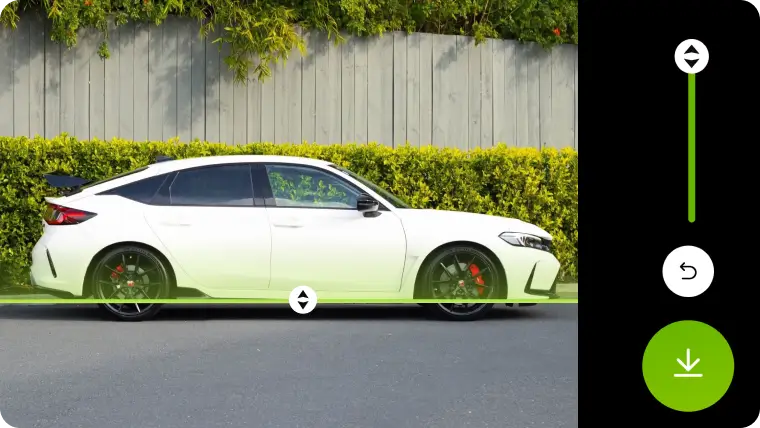
Preview Slammed Wheels and Air Ride Stance Together
One of the most powerful features of a modern wheel simulator is the ability to combine a slammed suspension with air ride stance. Air suspension allows you to raise and lower the car on demand, but the visual outcome depends heavily on wheel choice. A simulator lets you:
- Adjust ride height from a mild drop to a full “slammed” position.
- Toggle air ride settings to see how the car looks at driving height versus parked low.
- Preview tire stretch by selecting different tire widths and aspect ratios.
- Visualize fender-to-wheel clearance at every height increment.
> Pro Tip: Always simulate the car at both static and air ride heights. A wheel that looks perfect when parked might rub when you hit a bump at highway speed.
This preview capability saves you from buying wheels that only look good in one scenario. It also helps you decide if you need to roll fenders, add camber arms, or choose a different offset.
Carman Shows Your Full Stance Setup in Real Time
The Carman platform takes this concept further by offering real-time, interactive visualization. Instead of static images, you can rotate the car, zoom into the wheel wells, and see how the stance changes as you tweak parameters. This is not a simple photo editor—it’s a physics-aware simulator that accounts for suspension geometry.
What Carman offers:
- Live 3D rendering of your car model with custom wheels and tires.
- Drag-and-drop adjustments for ride height, camber, and wheel offset.
- Instant feedback on clearance issues, such as tire-to-fender contact.
- Side-by-side comparisons of different wheel and suspension combinations.
> Important: Carman’s real-time engine uses actual vehicle data to simulate how the suspension compresses and rebounds. This means you can trust the visual result more than a generic “lowered” filter.
This tool is invaluable for enthusiasts who want to dial in a flush fitment or an aggressive stance without trial and error. You can even share your digital build with friends or forums to get feedback before purchasing.
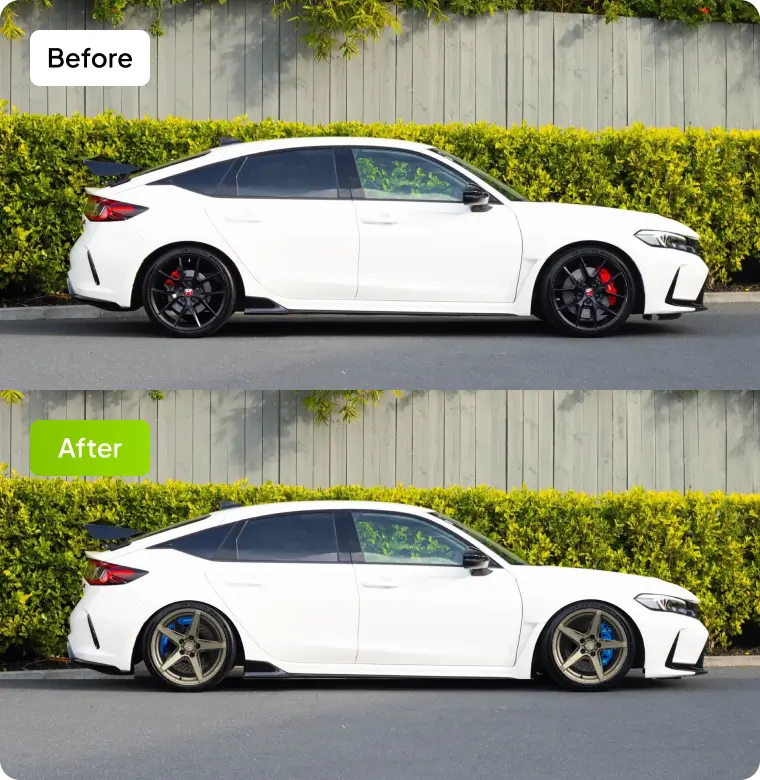
The Future of Digital Stance Builds Starts Here
The days of buying wheels and hoping they fit are fading. As car culture embraces digital tools, the lowered car wheel simulator is becoming an essential part of the modification process. Future developments will likely include:
- Augmented reality (AR) integration, allowing you to see the simulated stance on your actual car in your driveway.
- AI-driven recommendations that suggest optimal wheel sizes and offsets based on your desired stance.
- Community libraries where users share their exact setups, including suspension brands and alignment specs.
- Real-time cost calculators that estimate the total price of wheels, tires, suspension, and labor.
> The bottom line: A simulator doesn’t just show you a picture—it saves you money, time, and the headache of a botched install. Whether you’re building a show car or a daily driver, previewing your slammed wheel setup digitally is the smartest first step.
Conclusion
Modifying your car’s stance is an art, but it doesn’t have to be a guessing game. With a Lowered Car Wheel Simulator, you can explore hundreds of wheel and suspension combinations from your computer or phone. You’ll see exactly how the car will look at any ride height, with any offset, and with any tire size. Tools like Carman make this process interactive and accurate, giving you the confidence to order parts that fit perfectly the first time. So before you reach for the wrench, open the simulator—your future slammed build will thank you.